
Where Should Insurance Agencies Store Licensing Documents?
Scattered drives and email threads put renewals at risk. See how centralizing licensing documents inside InsureTrek keeps every file findable when it matters.
Where Should Insurance Agencies Store Licensing Documents?
Licensing documents belong in the platform where you manage licenses, not in a shared drive folder no one can find under pressure. Yet most insurance agencies store affidavits, E&O certificates, state license copies, and state-specific forms the same way they store everything else. Scattered across Google Drive, Dropbox, and old email threads. It works fine for general files. For licensing paperwork tied to active licenses and renewals, it breaks the moment someone needs a document fast. Disorganized insurance license file organization is not just inconvenient. It puts renewals at risk and creates compliance gaps that show up at the worst possible time.
The gap stays invisible until a state asks for a current Alabama Affidavit or a NIPR upload needs supporting paperwork. Then someone starts digging through folders, and the application sits still.
Why Does Google Drive Not Solve Insurance Document Storage?
Agencies already use Drive or Dropbox, and for general files those tools work well. For licensing documents, the gap shows up fast. Drive does not know what an affidavit is, which state a form covers, or when an E&O certificate expires. That context lives in folder naming conventions and in the head of whoever set the system up. When that admin leaves, the folders stay but the logic walks out with them, and the replacement spends a month asking where things are.
For agencies managing producer license file organization across multiple states, that missing context turns every document request into a manual search.
What Happens When a Licensing Document Goes Missing at Renewal?
An agency admin is processing a license renewal for a producer licensed in Georgia. The state asks for a current Georgia Affidavit. It exists somewhere. Finding it is the problem.
She checks Drive first. Four folders could have the affidavit. A filename search returns nothing since no one remembers what it was saved as. She switches to email, finds an affidavit, but it is dated from last year and might be stale. She pings a colleague, who eventually surfaces the right version. The renewal moves forward, twenty minutes late.
That twenty minutes is not the real cost. A stale document that slips through is a missed renewal waiting to happen. A state DOI audit that catches disorganized records is a compliance gap that could have been avoided. The delay was avoidable, and so was everything downstream from it.
The same problem compounds across states. When a producer applies in Georgia and submits a background affidavit or E&O certificate, that same document is often required again when applying in Texas, Florida, or any other state. Without a central place to store it, the admin ends up searching emails, digging through Drive, or contacting the producer again to request the same file. If the producer does not respond quickly, the application waits. The document was already collected once. The delay is entirely about where it was stored.
Where Insurance Agencies Should Store Licensing Documents?
The fix is to keep licensing documents inside the platform that already handles licensing work.
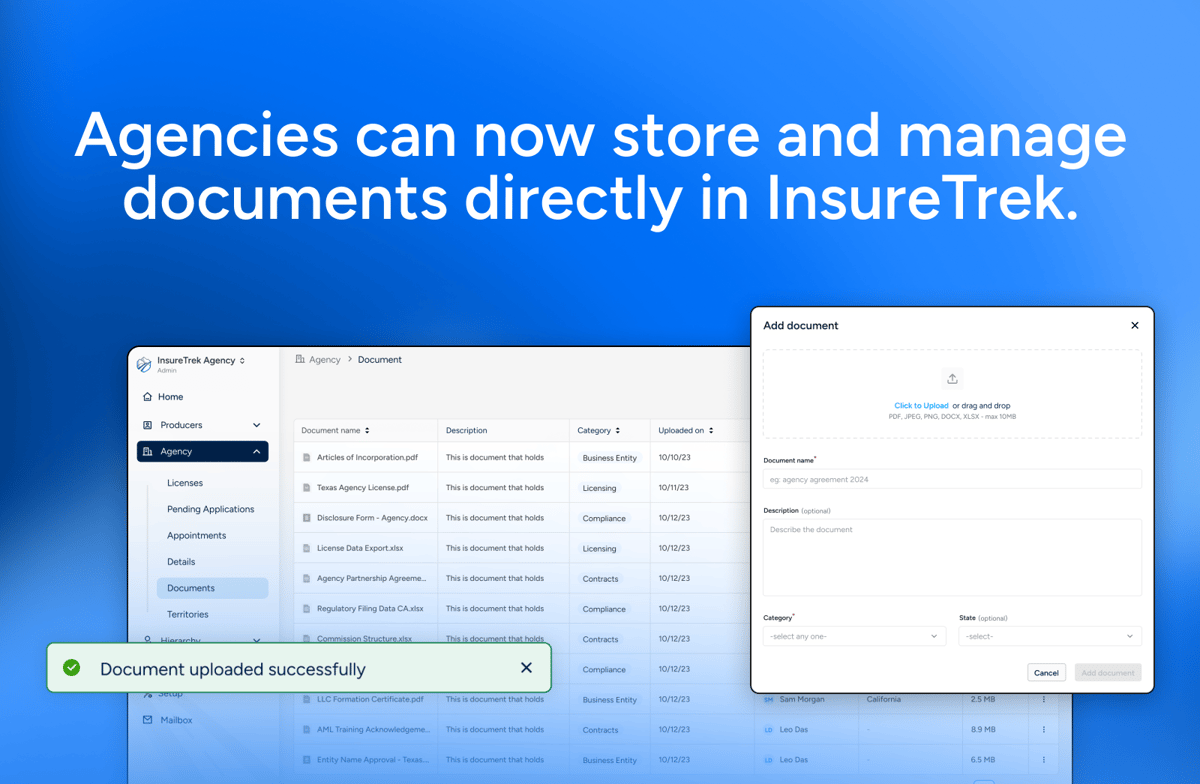
InsureTrek's Documents section lives under the Agency menu. Agency admins can upload, organize, and retrieve any agency-level licensing file from one place. Producers have their own separate Documents section under their producer account, where they upload and manage their individual licensing files independently.
When the state asks for a Georgia Affidavit, filter by state. When you need the most recent document, sort by date. Every file carries its name, category, state, upload date, and uploader name so the context travels with the document. When a new admin joins, they do not need a tour of someone else's folder system. The information is already there.
Once a document is uploaded, admins can preview it directly within InsureTrek without downloading it first, download it when needed for submission, and update it by uploading a newer version when documents expire or need to be replaced. No more wondering whether the file on screen is the current one.
When a producer applies for a license in a new state and that state requests a document already on file, the admin can retrieve and submit it directly from InsureTrek rather than starting the search over. The document was uploaded once. It is available every time.
Documents supports PDF, JPEG, PNG, DOCX, and XLSX files up to 10MB per file. The cap is intentional. Documents is built for producer document management and licensing paperwork, not bulk file storage.
How Documents Fits With Existing InsureTrek Workflows?
If a document is uploaded while answering background questions, it shows up in both the background questions screen and the Documents section automatically. Nothing gets re-uploaded, and both views stay in sync.
For existing InsureTrek customers, anything previously uploaded through Support Documents appears in the new section right away. There is no migration step.
Frequently Asked Questions
Where should an insurance agency store licensing documents?
Inside the same platform used to manage licenses and renewals. General storage tools work until someone leaves or a new admin joins. Without state, category, and upload history attached to each file, documents become hard to find, harder to trust, and a liability when a renewal deadline hits or a state DOI audit comes through.
What is InsureTrek's Documents section?
A storage area built into InsureTrek under the Agency menu for agency-level licensing files. Agency admins can upload, preview, download, and retrieve any licensing-related file without leaving the platform. Producers have a separate Documents section under their own profile where they upload and manage their individual licensing files independently.
What file types does the Documents section support?
PDF, JPEG, PNG, DOCX, and XLSX, up to 10MB per file.
Can producers access the Documents section?
Agency admins and producers each have their own Documents section. They are not shared. Agency admins access Documents under the Agency menu and manage agency-level licensing files there. Producers access their own separate Documents section within their accounts and manage their individual licensing files independently.
Can I preview or download uploaded documents?
Yes. Documents can be previewed directly within InsureTrek without downloading first. They can also be downloaded for submission or updated by uploading a newer version when a document expires or changes.
What if a licensing document is larger than 10MB?
Compress the file or split it into parts before uploading.
Does the Documents section replace the Support Documents tab?
No. Documents uploaded through background questions still live in that workflow, and they are also visible in the broader Documents section automatically.
Getting Started
Documents is live now under Agency in InsureTrek for agency admins, and under the producer account for individual producers. If you log in after this update, your existing files are already there.
If a licensing document is not in InsureTrek yet, the next state request or renewal deadline is a bad time to discover it. Open InsureTrek and upload it now.