
Insurance CE Requirements Explained for Independent Agents (2026)
This guide explains insurance CE requirements, common compliance issues, and how independent agents manage CE across multiple states.

Medicare Agent Onboarding: The Ultimate Guide for Agencies in 2026
Medicare agent onboarding is complex and time-sensitive. Learn how agencies reduce delays, manage licensing, and get agents selling faster.

Insurance License Timeline: How Long Does It Take to Get Licensed by State?
Learn how the insurance license timeline works, what affects approval time, and why licensing can take days in some states and weeks in others.

Medicare License Steps: How to Get Licensed in 3 Easy Steps in 2026
Learn the Medicare license steps with InsureTrek. Understand the process, avoid licensing delays, and stay on track from application to approval.
Alaska State License Updates - January 2026
Alaska insurance license changes effective Jan 2026: Health LOA becomes Accident & Health or Sickness (935), multiple DRLPs permitted, system downtime Jan 8-9
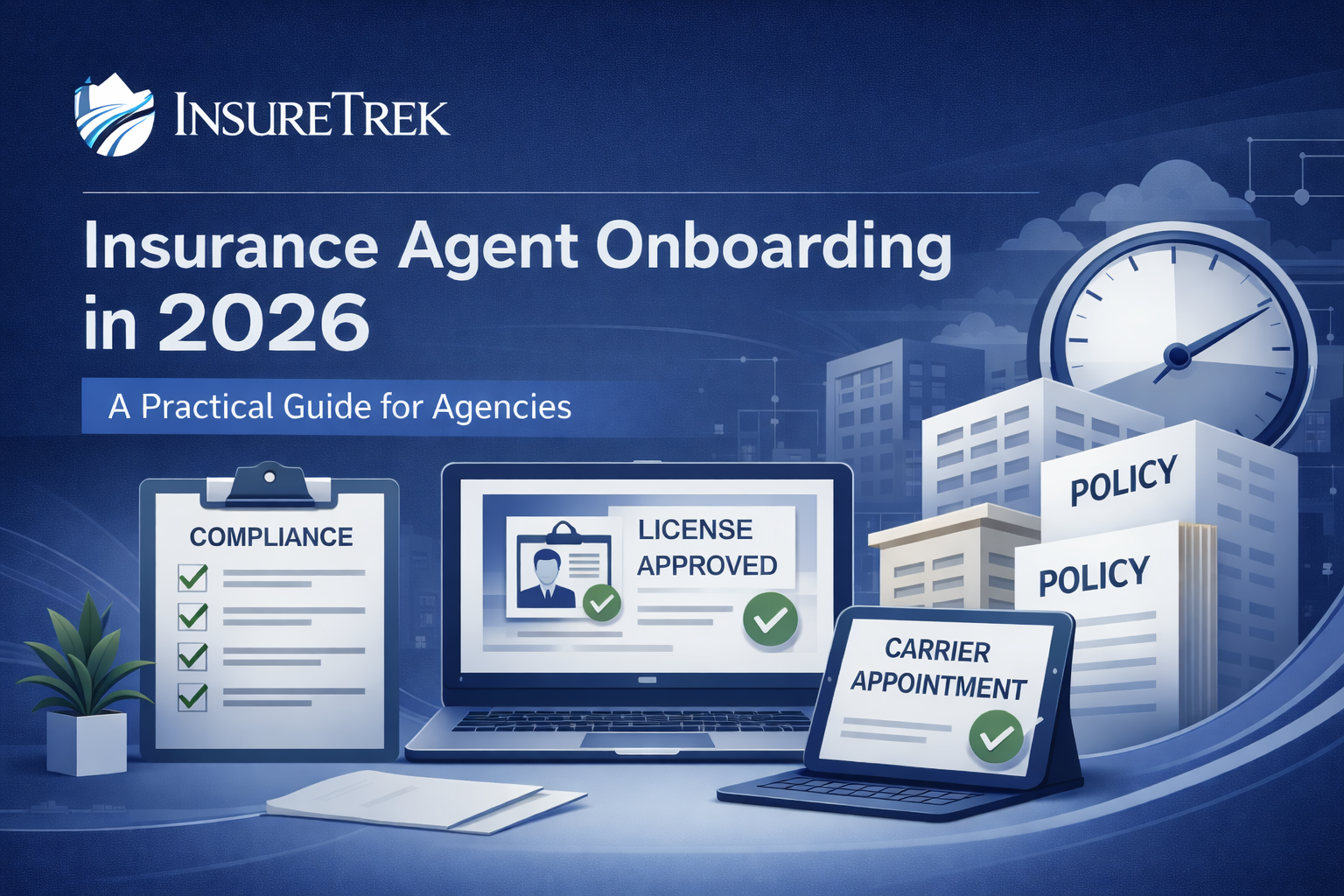
Insurance Agent Onboarding: A Practical, Compliance-First Guide for Agencies (2026)
Struggling with slow insurance agent onboarding? This guide breaks down licensing, carrier onboarding, and how InsureTrek help agencies reduce delays and compliance risk.
.png)
Lookup a Producer
Agency admins can now look up a producer's information without adding them to the team.

Introducing: InsureTrek Mobile
Independent Agents can now manage their licenses easier than ever with InsureTrek, available on the mobile web.

Lists Are Now Reports
We've updated our lists features to give you better insights.
QOL for License Management
Enhanced license overview for producers, better application controls, improved navigation, and important bug fixes.
Branch Agency Management
Branch agency support, interface improvements, bug fixes, and enhanced user experience updates throughout July 2025.
Weekly Reports and Enhanced Organizational Management
Automated weekly performance reports and improved organizational hierarchy management for upline agencies.
Enhanced Organizational Management
New hierarchy features and improved filtering experience for better organizational structure management.
A Few Quick Things
Small changes that add up - making InsureTrek easier to use with one-click answers, simplified assignments, and mobile improvements.
New Producer Home Page and Agency License Enhancements
Rebuilt producer home page with better organization and enhanced agency license functionality.
New Year Quality of Life Improvements
Bug fixes for individual producers and mobile optimization for the new year.
Bulk Onboarding Revamp and Year-End Improvements
Major improvements to bulk producer onboarding process and various quality-of-life enhancements.
Follow Ups for Manual Application Steps
New Follow Ups feature to track manual steps in applications, plus navigation and filtering improvements.
Unified License Management and Quick Filters
Combined license management into one screen with quick filters and enhanced List Builder functionality.
Agency Renewals and Email Improvements
Added agency license renewal functionality and improved email notifications and user experience.
License Amendments and Agency License Improvements
Introducing license amendments and cleaned up Agency Licenses screen for better management.
List Builder and Enhanced Reporting
New List Builder feature for filtering and exporting producer data, plus improved auto-renewal timing.
Enhanced Producer Management and New Features
Reworked Manage Producers screen with bulk operations, side panel details, and referral program introduction.
Improved Producer Management and Performance Enhancements
Reworked producer onboarding, cleaned up navigation, and significant performance improvements across the app.
Agency Licenses
Self Service Onboarding
Insurance CE Requirements Explained for Independent Agents (2026)
The Complete CE Requirements Guide for Independent Insurance Agents (2026)
Continuing education (CE) rarely feels urgent until it becomes a problem. A renewal deadline gets closer, a license status looks unclear, or a state portal shows something unexpected. That is usually when independent agents realize how much weight insurance CE requirements actually carry.
CE is not just a box to check. It determines whether a license stays active and whether an agent can continue selling without interruption. Because rules differ across states, managing CE becomes more complex as soon as an agent expands beyond a single jurisdiction.
This guide walks through how insurance CE requirements work in practice, why CE rules by state cause confusion, and how independent agents can manage CE more predictably.
What Insurance CE Requirements Actually Cover?
At a basic level, insurance CE requirements refer to the number and type of continuing education hours an agent must complete within a renewal cycle to keep a license active.
Most states require agents to complete a set number of insurance CE hours every one or two years. These hours are not always interchangeable. Some must be ethics-focused, others may be tied to specific lines of authority, and all must be completed through state-approved providers.
What often catches agents off guard is that completing coursework alone does not guarantee compliance. Credits must also be properly reported and accepted by the state before renewal.
Why CE Becomes Complicated for Independent Agents?
CE is manageable when an agent operates in a single state. Complexity increases quickly once multiple licenses are involved.
Independent agents commonly run into issues because:
- CE hour requirements differ by state
- Ethics and specialty credit rules are not consistent
- Reporting timelines vary
- Confirmation of accepted credits is not always immediate
Since agents typically need CE every two years, they cannot rely on assumptions or past experience alone.
How Insurance CE Hours Are Typically Structured?
Despite variations, most states follow a similar framework. Agents must complete required insurance CE hours within a defined renewal period. Courses must be approved, completed on time, and reported before renewal deadlines.
Problems usually arise when agents assume CE credits are automatically recorded or believe they have more time than they actually do. Without actively checking CE status, it is easy to move into renewal periods with incomplete information.
Where Manual CE Tracking Falls Apart?
Many independent agents track CE using a mix of spreadsheets, email confirmations, and notes from course providers. This approach works early on but becomes unreliable as licenses and states increase.
Manual CE tracking often leads to missed details, such as credits not being reported correctly or deadlines being miscalculated. Because CE issues often surface close to renewal, agents are left with limited time to correct them.
This uncertainty is what makes CE feel stressful rather than routine.
How Visibility Helps Independent Agents Stay on Track With CE?
While continuing education courses are completed through state-approved providers, staying compliant depends on knowing whether CE credits have been properly reported and accepted. Independent agents often manage multiple licenses across states, making it difficult to confirm CE readiness at a glance. Solutions like InsureTrek support this process by giving agents clear visibility into license status and CE readiness in one place, while working alongside trusted CE partners for course completion and reporting. This added clarity helps agents identify issues earlier and approach renewals with fewer last-minute surprises.
What Managing CE Should Feel Like?
Managing insurance CE requirements should feel structured, not chaotic. When CE status is easy to review, agents can plan coursework ahead of time, confirm reporting, and approach renewal periods with confidence.
A clearer approach to CE helps agents:
- Stay compliant across multiple states
- Reduce renewal-related stress
- Protect selling authority
- Spend less time on administrative follow-ups
Over time, this consistency turns CE into a routine responsibility rather than a recurring concern.
Final Thoughts
Insurance CE requirements are not going away, and state rules will continue to vary. What agents can control is how clearly they track progress and how early they identify issues.
Independent agents who understand CE rules by state, monitor insurance CE hours, and maintain visibility into their compliance status are better positioned to renew on time and keep business moving forward. With the right level of clarity, CE becomes manageable, predictable, and far less disruptive.
Medicare Agent Onboarding: The Ultimate Guide for Agencies in 2026
The Ultimate Guide to Medicare Agent Onboarding (2026)
Medicare agent onboarding is one of the most critical and time-sensitive processes for agencies and FMOs. Unlike other insurance lines, Medicare onboarding happens under strict regulatory oversight and seasonal pressure. When onboarding is delayed, agents miss selling windows. When it is done incorrectly, agencies face compliance risk.
Understanding Medicare agent onboarding and setting up a clear, repeatable process helps agencies bring agents to selling readiness faster while staying compliant.
This guide breaks down what Medicare agent onboarding involves, where agencies often run into problems, and how licensing visibility plays a central role in keeping onboarding on track.
What Is Medicare Agent Onboarding?
Medicare agent onboarding is the process of preparing an insurance producer to sell Medicare products legally and compliantly. It includes validating that an agent meets all state and regulatory requirements before they begin selling.
Onboarding Medicare agents typically involves:
- Verifying active insurance licenses by state
- Confirming license eligibility for Medicare sales
- Reviewing compliance readiness
- Ensuring agents are cleared before moving forward with appointments and selling
Because Medicare is heavily regulated, even small gaps in licensing information can delay onboarding or stop it entirely.
Why Medicare Agent Onboarding Is More Complex Than Other Lines?
Onboarding Medicare agents comes with added complexity compared to life or P&C onboarding. Medicare agents often operate across multiple states, and each state has its own licensing rules and timelines.
Common challenges agencies face include:
- Verifying licenses across several states
- Managing onboarding Medicare agents at scale during peak seasons
- Limited visibility into license readiness
- Discovering licensing issues late in the onboarding process
Without a clear view of licensing status, agencies often spend valuable time manually checking state portals or reconciling spreadsheets.
How the Medicare Agent Onboarding Process Works?
While every organization has its own workflow, most Medicare onboarding processes follow a similar structure.
1. License Status Verification
Before onboarding can move forward, agencies must confirm that an agent’s license is active and valid in the states where Medicare products will be sold.
2. Compliance Readiness Review
Agencies review whether licensing information is complete and aligned with Medicare requirements.
3. Readiness to Proceed
Only after license status is clear can agencies confidently move agents through the rest of the onboarding process.
Because each step depends on licensing being correct, visibility at the beginning of onboarding is critical.
Why Licensing Visibility Matters in Medicare Agent Onboarding?
One of the biggest causes of Medicare onboarding delays is uncertainty around licensing. Agencies often assume licensing is complete, only to find out later that a license is inactive, expired, or missing in a specific state.
This is where tools focused on license visibility make a difference.
InsureTrek supports Medicare agent onboarding by giving agencies a centralized view of agent license status across states. Instead of relying on manual checks or outdated records, teams can quickly confirm whether a Medicare agent’s license is active and ready before onboarding moves forward. This clarity helps agencies reduce delays, avoid last-minute surprises, and keep onboarding Medicare agents moving smoothly.
Manual Medicare Agent Onboarding Creates Unnecessary Risk
Many agencies still rely on spreadsheets and email-based tracking to manage onboarding Medicare agents. While this may work for a small number of agents, it becomes risky as volume increases.
Manual processes often lead to:
- Inconsistent license verification
- Delayed onboarding decisions
- Increased back-and-forth between teams
- Missed selling opportunities during peak period
Without reliable visibility, agencies are forced to react instead of plan.
How Digital Tools Improve Medicare Agent Onboarding?
Modern agencies are moving toward digital onboarding for agents to bring more structure and predictability into the process. While onboarding involves many steps, having clear license visibility early removes one of the biggest blockers.
Tools that support Medicare onboarding software workflows help agencies:
- See licensing status in one place
- Identify issues before onboarding stalls
- Reduce manual verification work
- Improve coordination across teams
This approach allows agencies to scale onboarding Medicare agents without adding unnecessary operational overhead.
Common Questions About Medicare Agent Onboarding
What is Medicare agent onboarding?
It is the process of preparing an agent to sell Medicare products by confirming licensing and compliance readiness.
Why does onboarding Medicare agents take so long?
Delays usually occur due to licensing issues that are discovered late in the process.
How can agencies reduce Medicare onboarding delays?
By improving visibility into license status early and removing manual checks.
Final Thoughts
Medicare agent onboarding is not just a compliance task. It directly affects how quickly agents can start selling and how smoothly agencies operate during critical selling seasons.
When agencies prioritize licensing visibility and remove uncertainty from the onboarding process, Medicare agent onboarding becomes faster, more predictable, and easier to manage.
Insurance License Timeline: How Long Does It Take to Get Licensed by State?
Insurance License Timeline: How Long Does It Take to Get an Insurance License in Each State?
“How long does it take to get an insurance license?” is one of the first questions new producers ask, and it is also one of the hardest to answer with a single number.
The reality is that the insurance license timeline varies widely by state, license type, background checks, and how prepared the applicant is. Some states process licenses in days. Others take weeks. Small delays, such as missing fingerprints or application errors, can quietly extend the timeline even further.
This guide explains how the insurance licensing timeline actually works, what impacts insurance license approval time, and how agencies and producers can avoid unnecessary delays.
What Does the Insurance License Timeline Really Mean?
The insurance license timeline refers to the total time it takes to move from exam completion to an active, approved license issued by a state Department of Insurance.
This timeline usually includes:
- Exam completion (applicable only for residents)
- Application submission
- Background checks and fingerprinting
- State review and approval
- License issuance
Many applicants assume licensing is instant once the exam is passed. In reality, most delays happen after the exam, during state review and verification.
How Long Does It Take to Get an Insurance License on Average?
On average, how long it takes to get an insurance license falls into three general ranges:
- Fast-processing states: 1 to 5 business days
- Moderate-processing states: 7 to 14 business days
The exact state insurance license processing time depends on application accuracy, fingerprint turnaround, and whether the license is resident or non-resident.
Insurance Licensing by State: What Typically Causes Delays
While every state has its own process, delays usually stem from the same few issues:
- Incomplete or incorrect applications
- Fingerprint or background check delays
- Exam records not syncing properly
- Manual state reviews
- Seasonal spikes in application volume
This is why insurance licensing by state can feel unpredictable. Two producers applying on the same day can receive approvals weeks apart.
Resident vs. Non-Resident Insurance License Timelines
Resident licenses typically take longer because they require full background reviews and fingerprinting.
Non-resident licenses are often processed faster, sometimes within a few days, because states rely on the producer’s home-state license for validation.
However, missing or outdated records can still slow down insurance license approval time, even for non-resident applications.
Why Insurance License Timelines Matter for Agencies?
For agencies, licensing delays affect more than just compliance. Every additional week an agent waits is a week without production.
This is why agencies closely monitor:
- State insurance license processing time
- Licensing status by producer
- Application errors that cause delays
- Readiness for carrier appointments
Without clear visibility into licensing progress, agencies often discover problems only after onboarding stalls.
How Agencies and Producers Can Shorten the Licensing Timeline?
Agencies cannot control state processing speed, but they can control preparation and visibility.
Teams that reduce delays typically:
- Submit complete and accurate applications
- Track licensing status in real time
- Monitor approvals across multiple states
- Identify bottlenecks early
- Avoid last-minute compliance issues
Platforms like InsureTrek help agencies and producers track license status, timelines, and approvals in one place, reducing guesswork and follow-ups.
How InsureTrek Fits Into the Insurance Licensing Timeline?
Tracking an insurance license timeline across states can quickly become difficult for both agencies and producers, especially when applications are processed at different speeds. InsureTrek helps teams gain clarity by centralizing license status, approvals, and delays in one place. Instead of manually checking state portals or guessing approval timelines, agencies can see where each license stands, identify bottlenecks early, and keep onboarding moving without unnecessary follow-ups.
Final Thoughts
The insurance license timeline is not just a regulatory detail. It directly impacts onboarding speed and revenue activation.
When agencies understand insurance licensing by state, monitor approvals closely, and reduce avoidable delays, producers get licensed faster and start selling sooner.
Clear timelines, better visibility, and fewer surprises make licensing predictable instead of painful.
Medicare License Steps: How to Get Licensed in 3 Easy Steps in 2026
How to Get Your Medicare License in 3 Easy Steps?
Getting licensed to sell Medicare is a major milestone for any insurance agent. While the process is regulated and state-specific, it does not have to feel overwhelming. When agents understand the right Medicare license steps, they can move through the process faster and avoid common delays that slow approval.
This guide breaks down the Medicare license process into three clear steps. It also explains where most applicants run into issues and how better visibility into license status helps agents and agencies stay on track.
Understanding the Medicare License Process
Before diving into the steps, it helps to understand what a Medicare license actually involves.
To sell Medicare products, an agent must hold an active insurance license, typically Life and Health, in the states where they plan to sell. That license must be approved and in good standing before any Medicare-specific selling can begin.
The Medicare license process is handled at the state level, which means timelines and requirements vary. Knowing what each step involves reduces surprises and helps agents move toward Medicare license approval more efficiently.
Step 1: Complete Pre-Licensing and Pass the Exam
The first of the Medicare license steps is completing pre-licensing education and passing the required exam.
Most states require resident agents to:
- Complete state-approved pre-licensing coursework
- Pass the Life and Health insurance exam
- Meet basic eligibility requirements
Passing the exam is necessary, but it does not mean an agent is ready to sell. Licensing approval still comes later in the process. This step is not required for Non-resident licenses.
Once the exam is passed, the next step is understanding how to apply for Medicare license at the state level. This stage is often more complex than agents expect, especially when applications span multiple states or require follow-up actions.
This step usually includes:
- Submitting an application through an online licensing system like InsureTrek, which helps agencies and producers centralize applications instead of managing them across multiple state portals
- If necessary, Completing follow-up requirements, such as fingerprinting and background checks, which are often requested after the initial submissio
- Paying state licensing fees, which must be completed accurately to avoid processing delays
- Providing required documentation, including disclosures and supporting forms requested by the state
This stage is where delays most often occur. Incomplete applications, missed follow-up items, or fingerprinting issues can slow Medicare license approval by weeks. Without clear visibility, agents and agencies often assume applications are progressing when they are actually stalled.
InsureTrek helps reduce this uncertainty by giving teams a clear view into application status and outstanding requirements. Instead of relying on inboxes or manual check-ins, agencies can see what has been submitted, what is pending, and what still needs attention, helping keep the Medicare licensing process moving forward without surprises.
Step 2: Apply for Your Medicare License
Once the exam is passed, the next step is understanding how to apply for a Medicare license at the state level.
This step typically includes:
- Submitting an application through the state or NIPR
- Completing fingerprinting and background checks
- Paying state licensing fees
- Providing required documentation
This is where delays often occur. Incomplete applications, fingerprint issues, or missing information can slow Medicare license approval by weeks. Tracking application status closely during this stage is critical.
Step 3: Wait for Medicare License Approval
The final step in the Medicare license steps is state approval.
Medicare license approval timelines vary widely. Some states approve licenses in a few days, especially during high-volume periods.
This waiting period is where uncertainty creates problems. Agents may think approval has happened when it has not, and agencies may move onboarding forward without full confirmation.
InsureTrek helps agencies and producers reduce this uncertainty by providing clear visibility into license status across states. Instead of manually checking multiple state portals or relying on spreadsheets, teams can confirm whether a Medicare license is approved and active before moving forward. This visibility helps prevent last-minute delays and keeps onboarding aligned with actual license readiness.
Why Medicare Licensing Delays Happen?
Even when agents follow the correct Medicare license process, delays still happen.
Common causes include:
- Errors in applications
- Fingerprint processing delays
- Background check issues
- High application volume at the state level
Without a reliable way to track license status, these issues often surface late and disrupt onboarding plans.
How Digital Tools Support Medicare Licensing?
While licensing decisions remain with the state, digital onboarding for agents and InsureTrek’s Medicare onboarding software make the process easier to manage.
By centralizing license visibility, agencies can:
- Track Medicare license approval in one place
- Reduce manual follow-ups
- Improve coordination during onboarding
- Make informed decisions based on real license status
This is where focused tools like InsureTrek fit naturally into the licensing workflow by removing guesswork and improving clarity.
Common Questions About Medicare License Steps
How long does the Medicare license process take?
Most agents complete the Medicare license process within a few weeks, depending on state timelines.
Can I sell Medicare immediately after passing the exam?
No. Selling can begin only after Medicare license approval is complete.
What causes the biggest delays in Medicare licensing?
Incomplete applications and lack of visibility into license status are the most common issues.
Final Thoughts
The Medicare license steps are straightforward when agents know what to expect and track progress carefully. Understanding the Medicare license process, applying correctly, and confirming Medicare license approval before onboarding helps agents start selling with confidence.
When license status is clear, agencies and producers spend less time chasing updates and more time preparing for a successful Medicare selling season.

Alaska State License Updates - January 2026
Alaska is making some updates to their licensing requirements, and we wanted to give you a heads-up so you're prepared. Here's what you need to know:
1. Health LOA Name Change
Effective: January 9, 2026, at 12:00 PM Central Time
Alaska is updating the Health (39) Line of Authority to Accident & Health or Sickness (935).
What this means for you: This is just a name and code change – your existing health licenses remain valid. No action is required on your part.
2. Multiple DRLPs Now Allowed
Good news! Alaska now allows you to list more than one Designated Responsible Licensed Producer (DRLP/Compliance Officer) on agency license applications.
What this means: You have more flexibility in how you structure your agency's compliance oversight.
3. DRLP Coverage Requirement
When submitting an agency license application, your designated DRLPs must collectively cover all Lines of Authority (LOAs) you're applying for.
Example: If you're applying for Property, Casualty, and Health LOAs, make sure your DRLPs' licenses cover all three areas combined.
4. System Downtime (Important!)
Downtime Window:January 8, 2026, 4:00 PM CT through January 9, 2026, 12:00 PM CT
During this time, Alaska will not process any license transactions.
⚠️ Important: Any applications submitted during this window will be automatically declined. Please plan accordingly and avoid submitting Alaska applications during this timeframe.
We recommend: Submit any urgent Alaska applications before January 8 at 4:00 PM CT, or wait until after January 9 at 12:00 PM CT.
Insurance Agent Onboarding: A Practical, Compliance-First Guide for Agencies (2026)
What Is Insurance Agent Onboarding? A Practical Guide for Agencies in 2026
Insurance agent onboarding is one of those processes agencies know is critical — yet often underestimate. When done well, onboarding accelerates time to first policy, ensures compliance, and sets producers up for long-term success. When done poorly, it creates delays, compliance gaps, and lost revenue.
This guide explains what insurance agent onboarding really means, how it works in practice, and why modern agencies are rethinking their onboarding workflows in favor of more structured, digital-first approaches.
What Is Insurance Agent Onboarding?
Insurance agent onboarding is the structured process of bringing a new producer into an agency so they can legally sell insurance, get appointed with carriers, and operate compliantly from day one.
Unlike onboarding in other industries, insurance onboarding is heavily regulated. It doesn’t stop at paperwork or training. A complete insurance onboarding process typically includes:
- License verification and validation
- Submitting carrier appointments
- Carrier onboarding requirement
- Access to internal systems and workflows
For agencies, onboarding is not just an HR task — it’s a compliance and revenue function.
Why Insurance Agent Onboarding Is So Complex?
Onboarding an insurance producer involves far more moving parts than most agencies expect. Each producer may operate in different states, hold different licenses, or require different carrier appointments.
Common challenges agencies face include:
- Tracking license status across states
- Managing insurance carrier onboarding timelines
- Relying on manual checklists and spreadsheets
Without a clear agent onboarding workflow, agencies often experience delays that prevent producers from selling — sometimes for weeks.
The Typical Insurance Agent Onboarding Process (Step by Step)
While every agency is different, most follow a similar onboarding flow:
1. License & Eligibility Verification
Before anything else, agencies must confirm that a producer’s license is active, valid, and appropriate for the states and products they plan to sell.
2.Insurance Carrier Onboarding
Carriers require proof of licensing, compliance, and eligibility before approving appointments. Missing or outdated information is one of the biggest causes of onboarding delays.
3. Internal System Access
Once compliant and appointed, agents are granted access to agency tools, CRM systems, and policy platforms.
Each step depends on the one before it — which is why onboarding bottlenecks are so common.
Why Manual Agent Onboarding Breaks at Scale?
Many agencies still rely on emails, spreadsheets, PDFs, and shared folders to manage onboarding. That approach may work for a handful of agents, but it quickly fails as volume increases.
Manual onboarding leads to:
- Missed compliance checks
- Duplicate data entry
- Inconsistent producer experiences
- Poor visibility into onboarding status
- Slower time to first policy
As agencies grow, these inefficiencies compound. What once took days can stretch into weeks.
What Is Digital Onboarding for Insurance Agents?
Digital onboarding for insurance agents replaces manual steps with centralized, automated workflows. Instead of chasing documents and dates, agencies use software to manage onboarding end to end.
A digital onboarding system allows agencies to:
- Track producer licensing and eligibility in real time
- Standardize onboarding workflows across teams
- Reduce back-and-forth with producers
- Identify compliance issues before they delay appointments
- Onboard agents faster without adding headcount
This is where platforms like InsureTrek play a critical role — by centralizing licensing data, compliance status, and onboarding visibility in one place.
How Modern Agencies Improve Agent Onboarding?
High-performing agencies treat onboarding as a repeatable system, not a one-off task. They focus on clarity, speed, and compliance from day one.
The most effective agencies:
- Use standardized onboarding workflows
- Eliminate spreadsheets and email-based tracking
- Gain real-time visibility into producer readiness
- Align licensing, compliance, and carrier onboarding
- Automate reminders and status checks
This approach reduces onboarding time, lowers compliance risk, and helps producers start selling faster.
Frequently Asked Questions
What is insurance agent onboarding?
Insurance agent onboarding is the process of preparing a producer to sell insurance legally and compliantly, including licensing, compliance checks, and carrier appointments.
Why does insurance agent onboarding take so long?
Delays usually come from manual processes, missing licensing information, and lack of visibility across compliance and carrier onboarding steps.
How can agencies speed up agent onboarding?
By using digital onboarding tools that centralize licensing data, automate workflows, and provide real-time status updates.
Final Thoughts
Insurance agent onboarding is no longer just an operational task — it’s a growth lever. Agencies that streamline onboarding reduce compliance risk, activate producers faster, and scale without adding operational complexity.
With the InsureTrek in place, onboarding becomes predictable, efficient, and stress-free — for both agencies and producers.

Lookup a Producer
As you're recruiting people to join your agency, you might want to know where they've worked, where they're able to work, and a little bit about their history. On Insuretrek, you can do that using our producer lookup feature.
To use it, first head to Manage Producers, and click the new Lookup button

Then, enter the producer's NPN, and you'll get a view of their Licenses and Appointments:
.png)
.png)
From there, you'll be able to keep them in your list and add them to your team later on when you decide to hire them.
Producer lookup is included for all active InsureTrek Agency subscribers!

Introducing: InsureTrek Mobile
Now Independent Insurance Agents can apply for licenses, renew their existing licenses, and put their compliance on auto-pilot from their phones. In the first version of InsureTrek built from the ground up for a mobile experience, agents can:
- Sign up
- View their upcoming renewals
- Complete their profile
- Apply for a new license in any state
- Manage auto renewals
all from their phone.
Lists Are Now Reports
We're making a change to help you find and use one of InsureTrek's most valuable features more easily!
What's Changing:
Our Lists feature is getting a new name and a new home. It's now called Reports and has moved to a better spot in your navigation menu.
- New Location: Setup → Reports
- Previously: Organization → Hierarchy → Lists.
What You Can Do:
- Extract producer, license, and invoice reports
- Apply custom filters
- Save your custom reports for quick access
- Export the filtered data as CSV files.
All your existing saved reports are right where you left them: just in the new location. The functionality remains the same, just easier to find! Check it out: Reports
If you haven't explored this feature yet, now's a great time to see how it can streamline your agency management.

QOL for License Management
This release focuses on quality of life improvements and important bug fixes based on your feedback. We've made license management more intuitive and resolved several issues that were affecting your daily workflows.
New Features
Enhanced License Overview for Producers
Individual producers now have the same powerful license overview that agencies use. The "All Licenses" view for producers has been completely redesigned to match the functionality available to agencies. You can now see traffic light status indicators, estimated fees, and clear action buttons (Apply, Renew, Auto Apply) directly from your main license view. For individual producers not on teams, we've also cleaned up the interface by removing the unnecessary "Assignment Status" column.
Resident License Application Controls
We now prevent conflicting resident license applications. The system will automatically restrict producers from applying for resident licenses in additional states when they already hold an active resident license elsewhere. This prevents compliance issues and reduces processing delays. We've also added a new "Voluntarily Surrendered" status for licenses that producers have formally surrendered to their state's Department of Insurance.
Improvements
Better Table Navigation Experience
Navigating through paginated tables is now much smoother. When you click to the next or previous page in any table view, the page automatically scrolls to the top of the table. This eliminates the confusion of landing on a new page but still seeing the bottom of the previous page's content.
Bug Fixes
Fixed Territories Page Pagination
The territories page now properly displays different content on each page. Previously, clicking through pages would show the same records repeatedly. The pagination now works correctly, showing the appropriate subset of territories for each page.
Resolved Georgia Producer License Display Issue
Fixed an issue where Georgia producer licenses were incorrectly appearing in upcoming renewals. Some GA licenses with expiration dates more than two years in the future were showing up in renewal lists when they shouldn't have been visible.
Branch Agency Management
This month brought significant enhancements to InsureTrek with new branch agency capabilities, improved user experience, and important bug fixes to ensure reliable operation.
New Features
Branch Agency Management
Insurance agencies can now create and manage branch locations within InsureTrek. Branch agencies maintain the same licensing credentials as their parent agency while operating with customized territories and preferences. This enables multi-location agencies to efficiently oversee their distributed operations from a single platform.
Improvements
Simplified Signup Flow
We've cleaned up the sign up process to make it easier to create accounts and get started in InsureTrek.
Clearer License Management Navigation
- Renamed "Producer Licenses" to "State Licenses" throughout the platform for better clarity and consistency across individual producer accounts, admin views, and the producer portal
Bug Fixes
Email and Dashboard Fixes
- Fixed weekly summary email delivery - Weekly summary reports now correctly reach all intended recipients. Agency administrators will receive summaries for their teams, while individual producers will receive reports at their registered email addresses.
- Corrected license renewal counts on dashboard - The "renewing soon" counter on your home page now accurately displays the number of licenses approaching renewal, ensuring you never miss important renewal deadlines.
Weekly Reports and Enhanced Organizational Management
This month's updates focus on keeping you better informed about your business performance and expanding organizational management capabilities for upline agencies.
Weekly Performance Reports
Stay on top of your business with automated weekly summary reports delivered every Monday morning. These comprehensive reports provide a clear overview of your licensing activity and associated costs, helping you track progress and make informed decisions about your operations.
- For Agencies: Agency administrators now receive detailed summaries covering both agency licenses and all onboarded producer licenses, along with complete cost breakdowns for better financial visibility.
- For Individual Producers: Get personalized weekly insights into your licensing portfolio and expenses, delivered directly to your inbox to help you stay organized and plan ahead.
Enhanced Organizational Management
Upline agencies can now seamlessly onboard and manage downline agencies through our improved organizational hierarchy system. This streamlined process simplifies multi-tier agency relationships and provides better oversight capabilities for complex organizational structures.
Enhanced Organizational Management
Enhanced Organizational Hierarchy Management
We've introduced a new hierarchy feature that gives you better control over how your organizational structure is displayed and managed within InsureTrek. This enhancement makes it easier to navigate between different levels of your agency structure and understand the relationships between agencies and team members.
Improvements
Refined Filtering Experience
We've improved the filtering system to provide clearer visual feedback when options are unavailable. When you apply filters that limit available selections, disabled options now properly prevent accidental clicks, making the interface more intuitive and preventing confusion.
Better Layout Consistency
We've fixed layout inconsistencies in organizational popups to ensure they look great whether you have carriers assigned or not. The interface now maintains proper spacing and visual balance across all scenarios, giving you a more polished experience when reviewing organizational details.
A Few Quick Things
This release is almost all about quality of life improvements. We're always talking to users and trying to make InsureTrek easier to use, and decided to push out a bunch of small changes that add up!
Quality of Life Improvements
- Now on background questions, Yes/No questions can be answered in one click (instead of having to pick an option from a dropdown)
- When making assignments, if you don't have any territories configured, you'll be able to pick states in one fewer click
- If you're creating a new account on mobile, we'll email you a link when you finish signing up (since InsureTrek is desktop and tablet only, for now!)
- We tidied up My Account a bit.
- It's now easier to toggle auto-renewal on and off from Manage Licenses
New Producer Home Page and Agency License Enhancements
A New Home for Producers
We've rebuilt the producer home page to make it a lot easier to navigate for admins and producers.
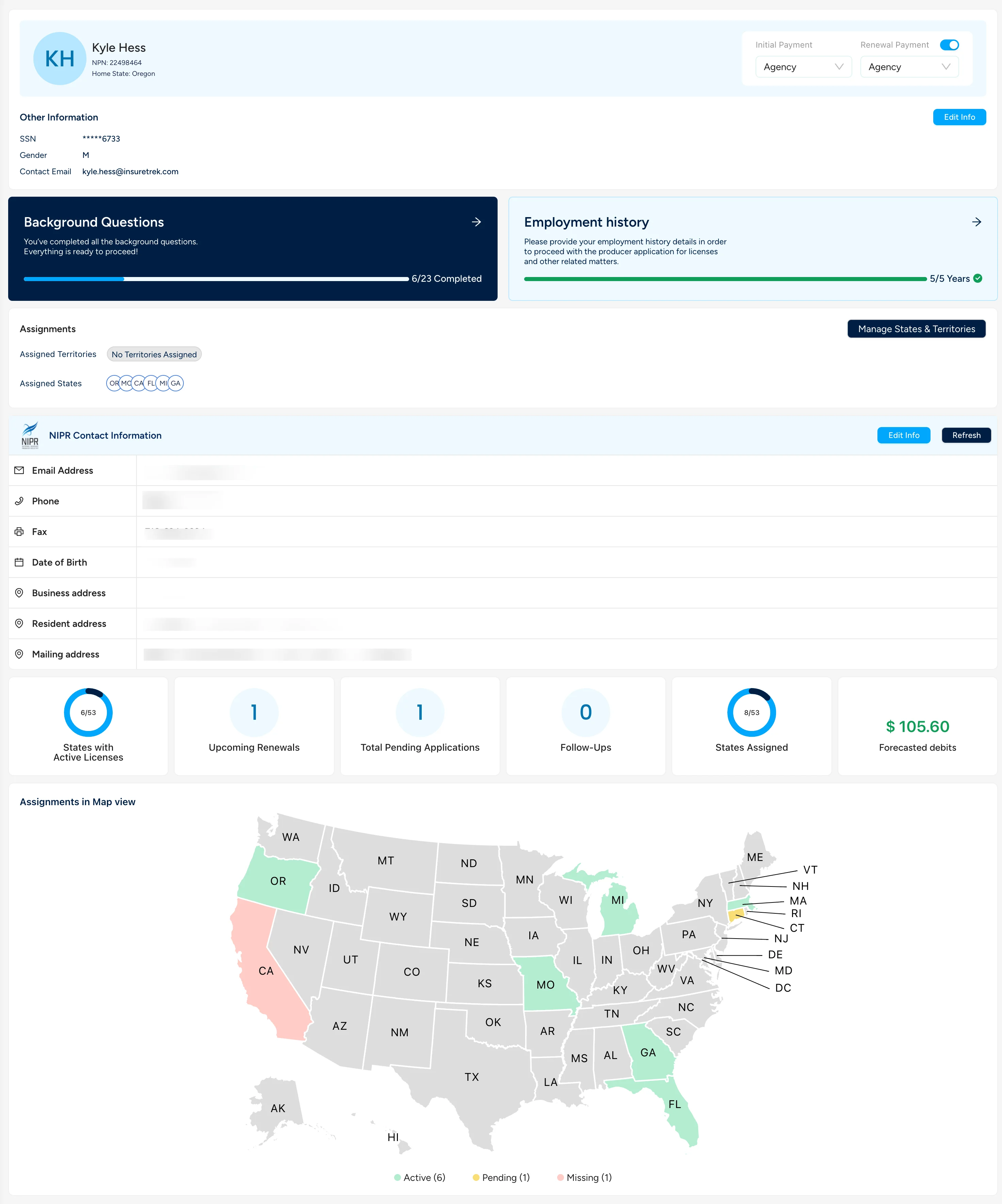
- Reorganized key details
- Split out NIPR profile information from InsureTrek profile information
- Made it more obvious whether or not Background Questions and Employment History has been filled in
Quality of Life Improvements
- We cleaned up some bugs to keep things in better sync with your subscription when you add or remove a producer from your team
- Agency licenses now have (nearly) all of the same tools and functionality as producer licenses
- We now show things like License Number in more places
New Year Quality of Life Improvements
Happy new year! We're excited about everything we'll get to build this year.
Quality of Life Improvements
Fixed a bug where individual producers couldn't edit their own profile information
Fixed a bug wehre individual producers (not on a team) couldn't manage their own licenses
When creating a new account on Mobile, the whole process has been optimized to fit on your screen
Now when you save background questions, we'll save all of the questions you've answered across all of the states
Bulk Onboarding Revamp and Year-End Improvements
Bulk Onboarding Revamp
We've done quite a bit of work to make the Bulk Onboarding process a lot simpler. Now when you bulk onboard producers:
The document you upload is simpler
You can keep track of the status of previous onboards
You can configure payment details and auto-renew settings for each producer
After producers have been added, you now manage their assignments on Manage Producers -- and now you can edit those assignments for multipel producers at at time.
Other Fixes
We have just a few more quality-of-life improvments as we wrap up the year.
Now, users can manually apply for a license anytime it appears in Upcoming Renewals (even if it's set to auto-renew)
Territories got a fresh coat of paint, and is now much easier to update
We've cleaned up some bugs around search and filtering throughout the app
Follow Ups for Manual Application Steps
Follow Ups
With InsureTrek, we're helping automate as much as we can about how you apply for a license. But in a few states, there are still manual steps that you have to address. So, we've introduced Follow Ups.
With Follow Ups, you can keep track of the manual steps you need to take on an application. Here's how to use it:
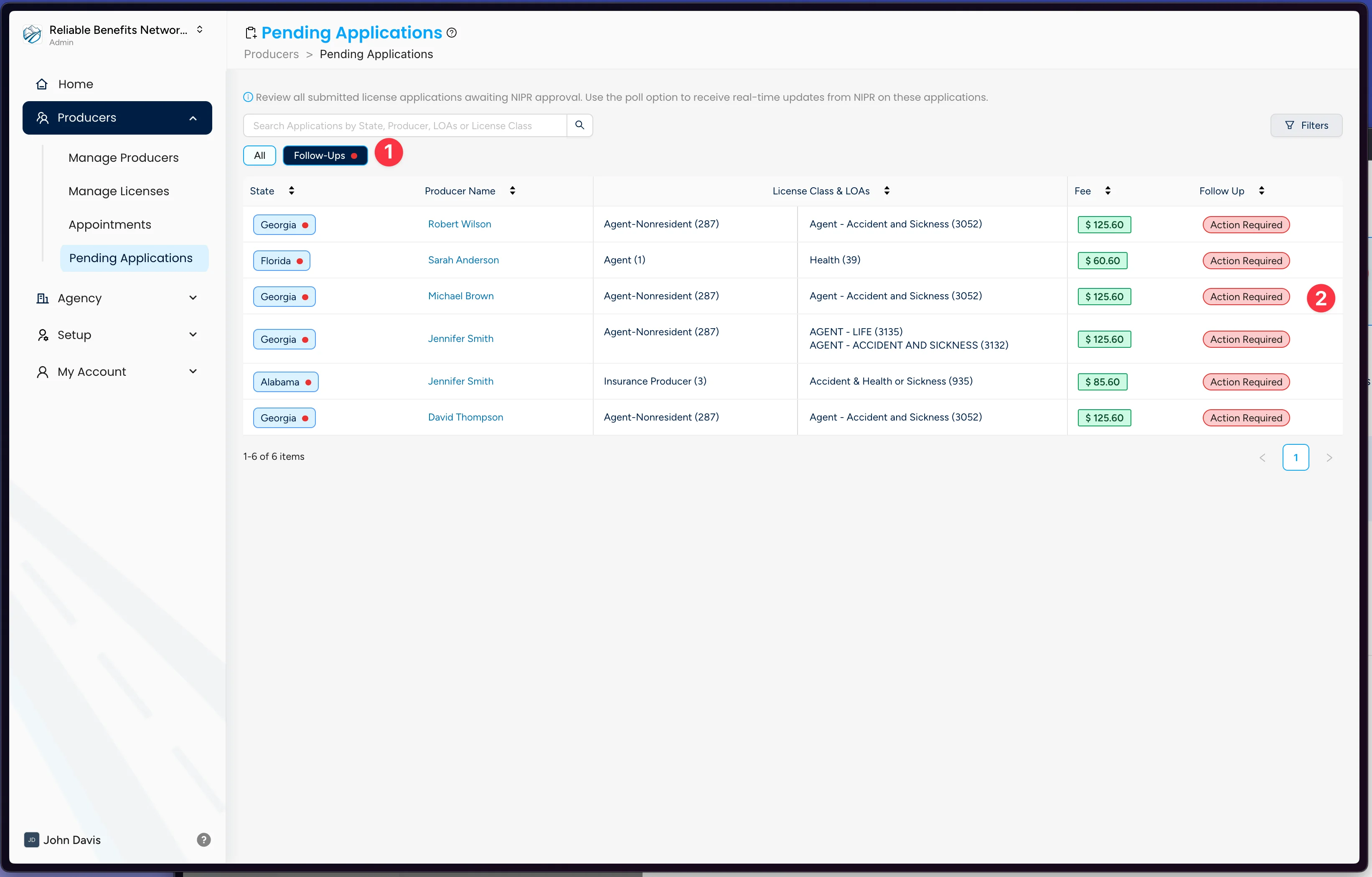
- Head to your Pending Applications and click the Follow Ups button.
- Any pending application that has a manual follow up will be in this list.
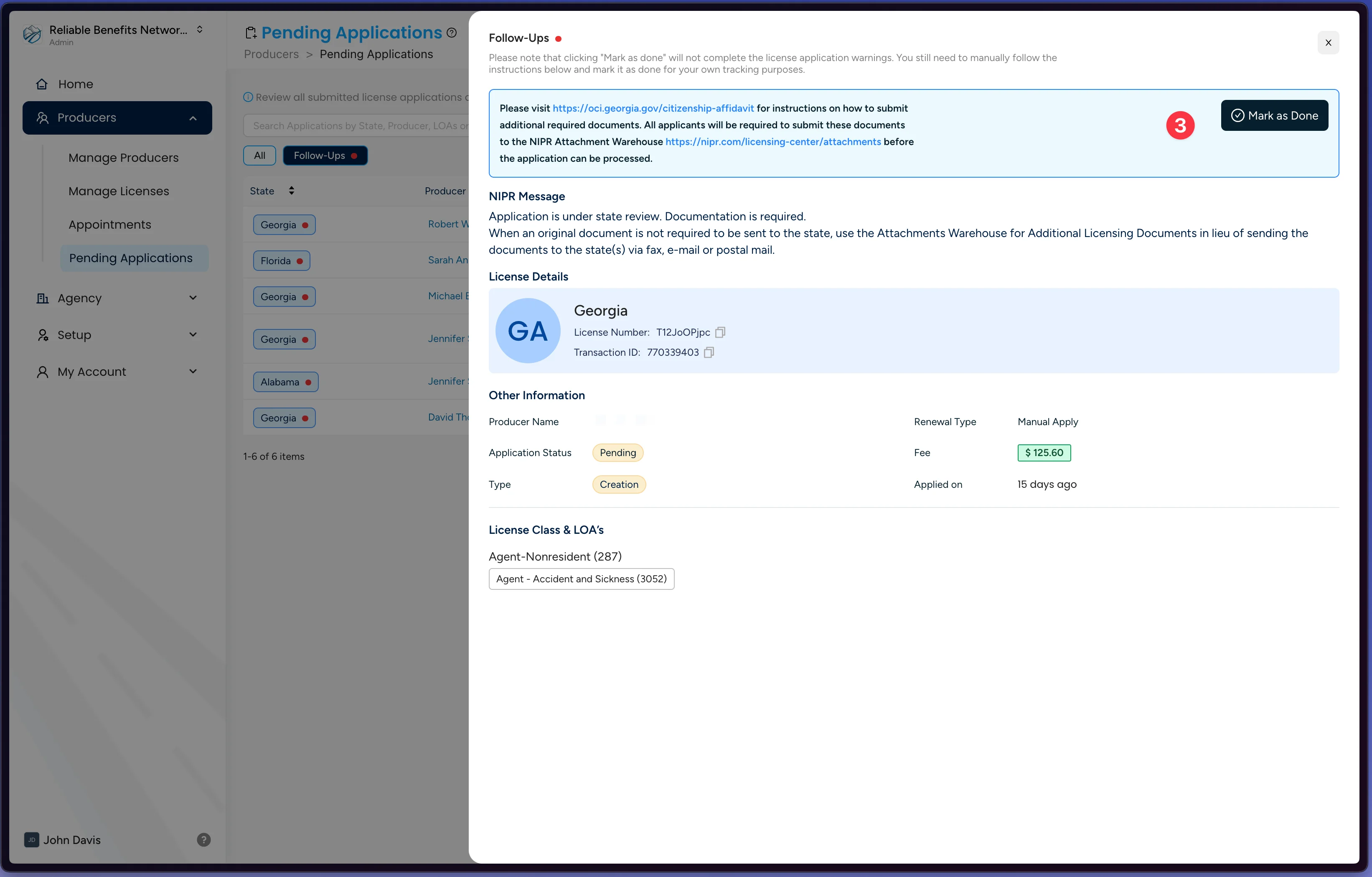
When you open it up, you'll be able to mark whether or not you've taken this action, and we'll keep track of this for you.
Follow Ups doesn't do the action for you! It's simply a way for you to keep track of whether or not you've done this yourself. Just because you've marked it complete in InsureTrek doesn't mean you've actually done the action. This feature is here to help you try to keep track of things while they are pending.
Other Fixes
- Navigation has been tidied up
- You can now link directly to Quick Views on your lists, and pages now have an "All" quick filter
- We now show the NIPR Transaction ID on pending applications, making it easier for you to check the status with NIPR directly
- Fixed some bugs around filtering with the new Quick Filters
- Expiration date now shows on all license views (not just Upcoming Renewals)
- Some bug fixes around auto-renewals in the backend
Unified License Management and Quick Filters
Lists and Quick Filters
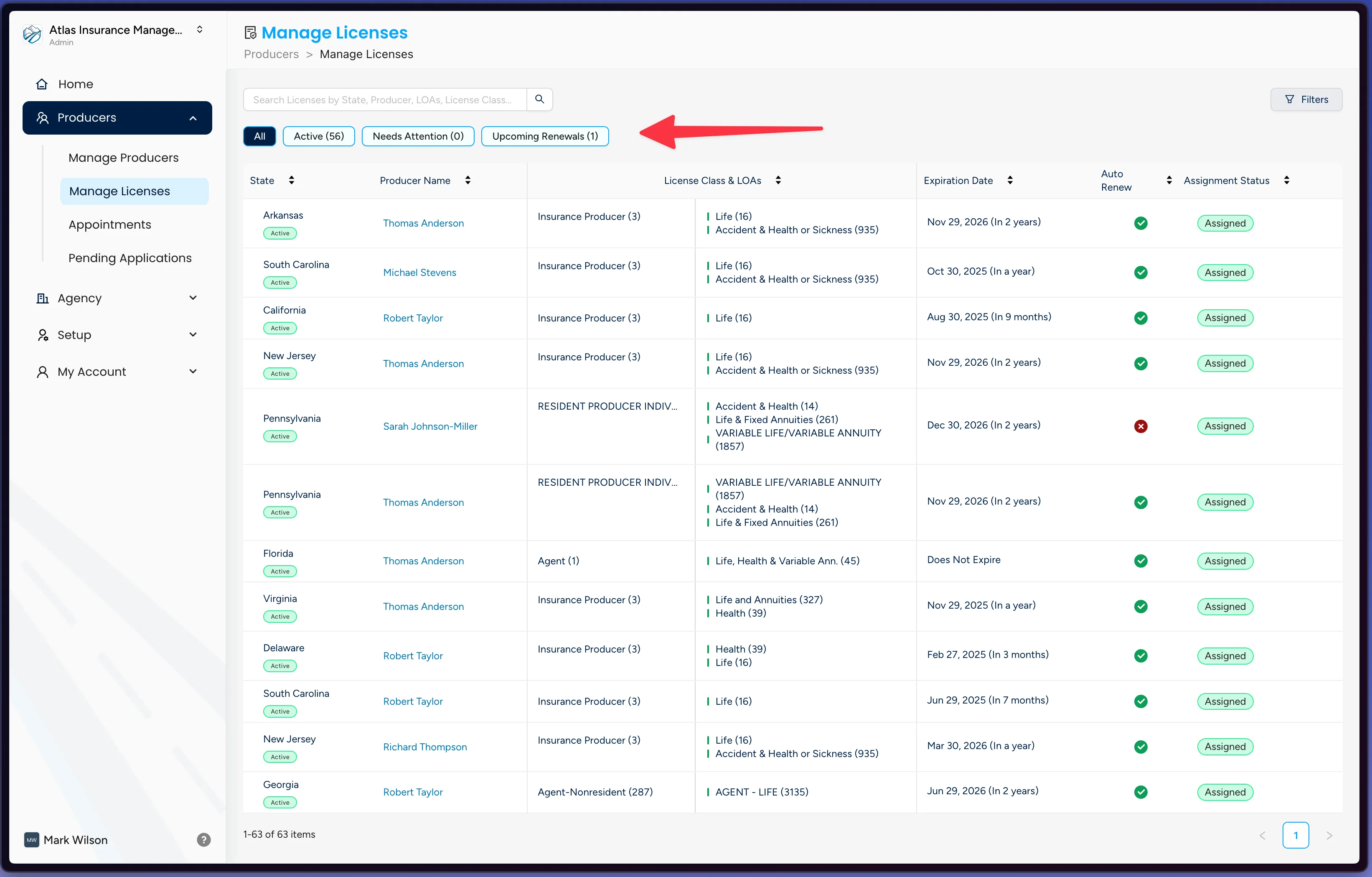
In an effort to make InsureTrek easier to nagivate around, we've combined your lists across the application. Now instead of having a bunch of pages to manage your licenses, you can see everyone on one screen: Manage Licenses. From there you can see your different views, including your Active Licenses, Needs Attention, and Upcoming Renewals.
Other Fixes
- Application Status will now show as a part of your License Status, so you can better see licenses which have things in progress
- We updated our logic so job titles are limited to 25 characters, which matches what NIPR is expecting to get.
- List Builder now includes more information, including:- Who a producer reports to - Business Address - some general bug fixes based on your feedback
Agency Renewals and Email Improvements
Agency Renewals
With the cleaned up Agency Licneses we introduced last week, now you can renew your agency licenses direclty on the Agency Licenses screen. These are managed entirely on this screen, but the application flow is very similar to the one for producers.
Other Fixes
We've improved the look and feel of a lot our email notifications.
We found some weird bugs on the All Licenses screen when filtering, and got those cleaned up.
We've made it easier to onboard another producer after you've added one.
License Amendments and Agency License Improvements
Amendments
Now you can amend an existing license class for a producer or an agency. Amendments work just the same way any other initial application or renewal does, and you manage them directly in teh same screens.
Cleaned Up Agency Licenses
Based on your feedback, we've cleaned up the Agency Licenses screen to make it easier to see what's going on. It's now much easier to see all of your agency licenses, their statuses, and manage them all on one screen.
Other Fixes
We've been cleaning up weird scenarios in a few states, including CT, IN, and TX.
We've clenaed up some flows on Manage Producers
List Builder and Enhanced Reporting
List Builder
Now in InsureTrek, it's a lot easier to get information about your producers out of the system. We've introduced an entirely new "List Builder".
With it, you can:
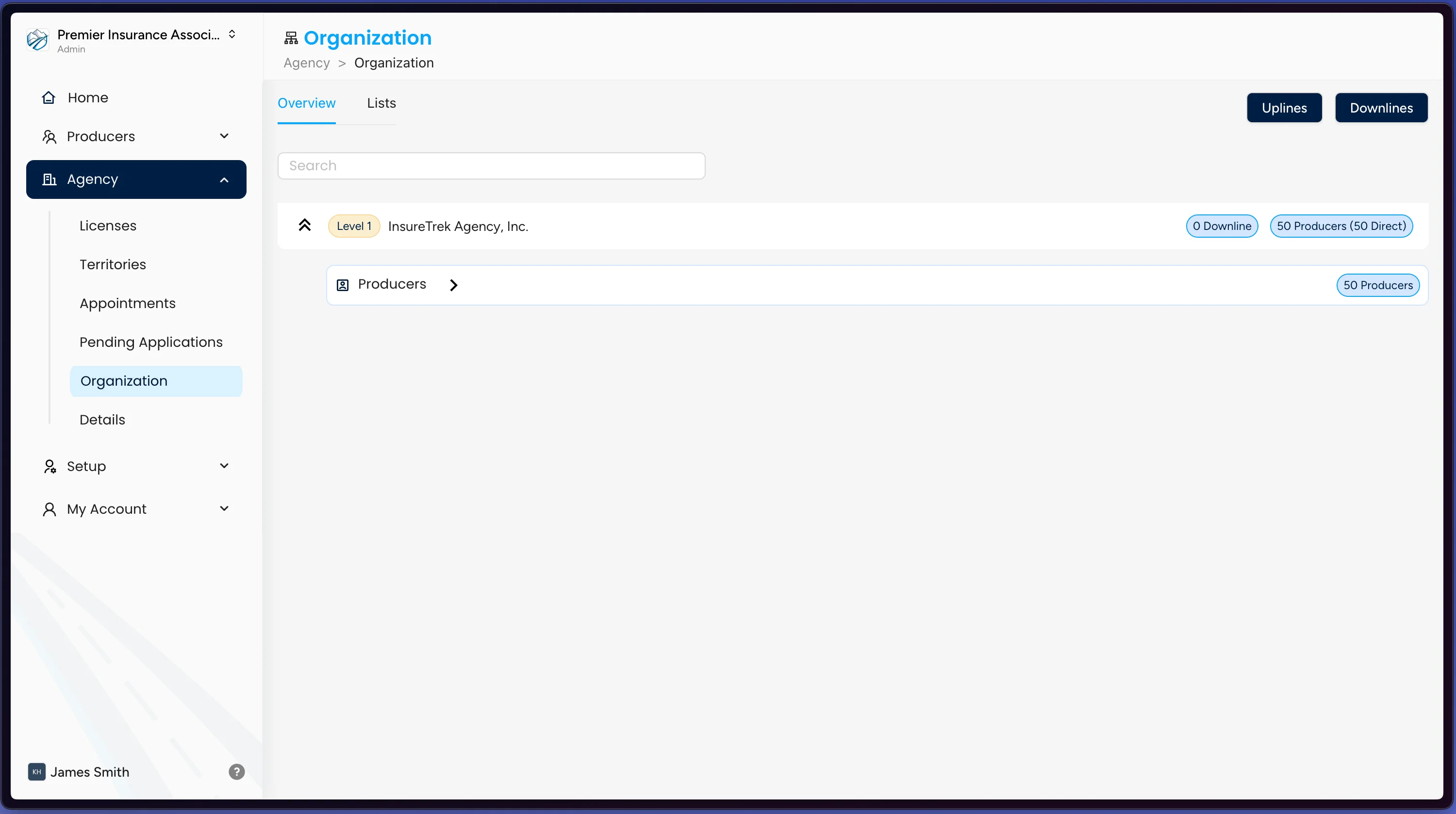
- See a whole new Overview Screen for your team and all of your downlines
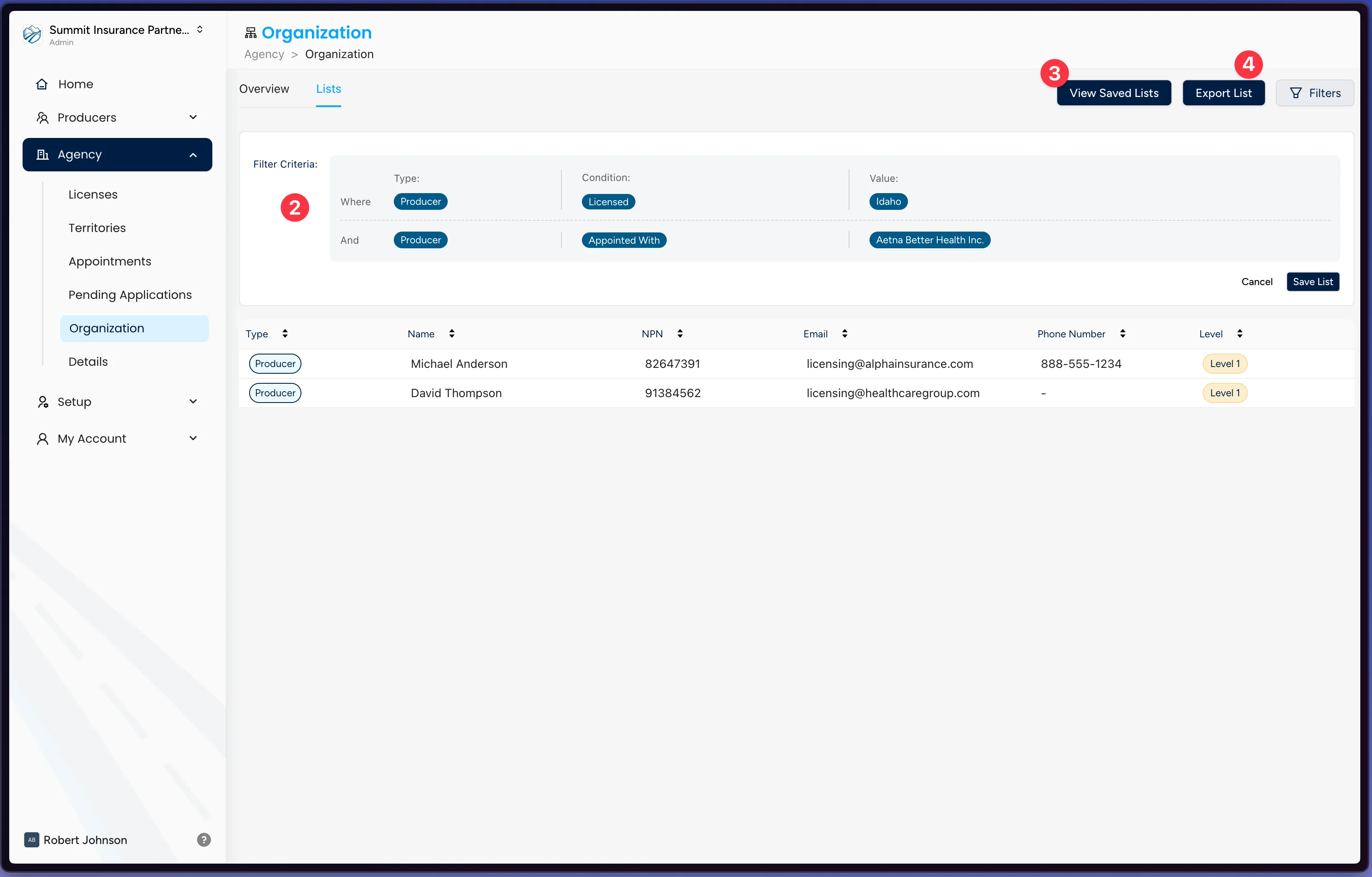
- Filter a list by a bunch of properties, including:
- Agency or Producer
- Whether someone is licensed in a state
- Whether someone has an appointment in a state
- Save lists for export
- Download a saved list in one click
Other Fixes
- Auto-renewing applications will not start to kick off 45 days before expiration date, giving you plenty of time to have them settle in case any issues pop up.
- Now when you click on an engine light in the producer portal, you'll be taken to the place to correct that (like Background Questions, if they are missing)
- Cleaned up some of the flow around applying for a new Agency license
Enhanced Producer Management and New Features
We've reworked the Manage Producers screen to give you the ability to do a lot more from one location.
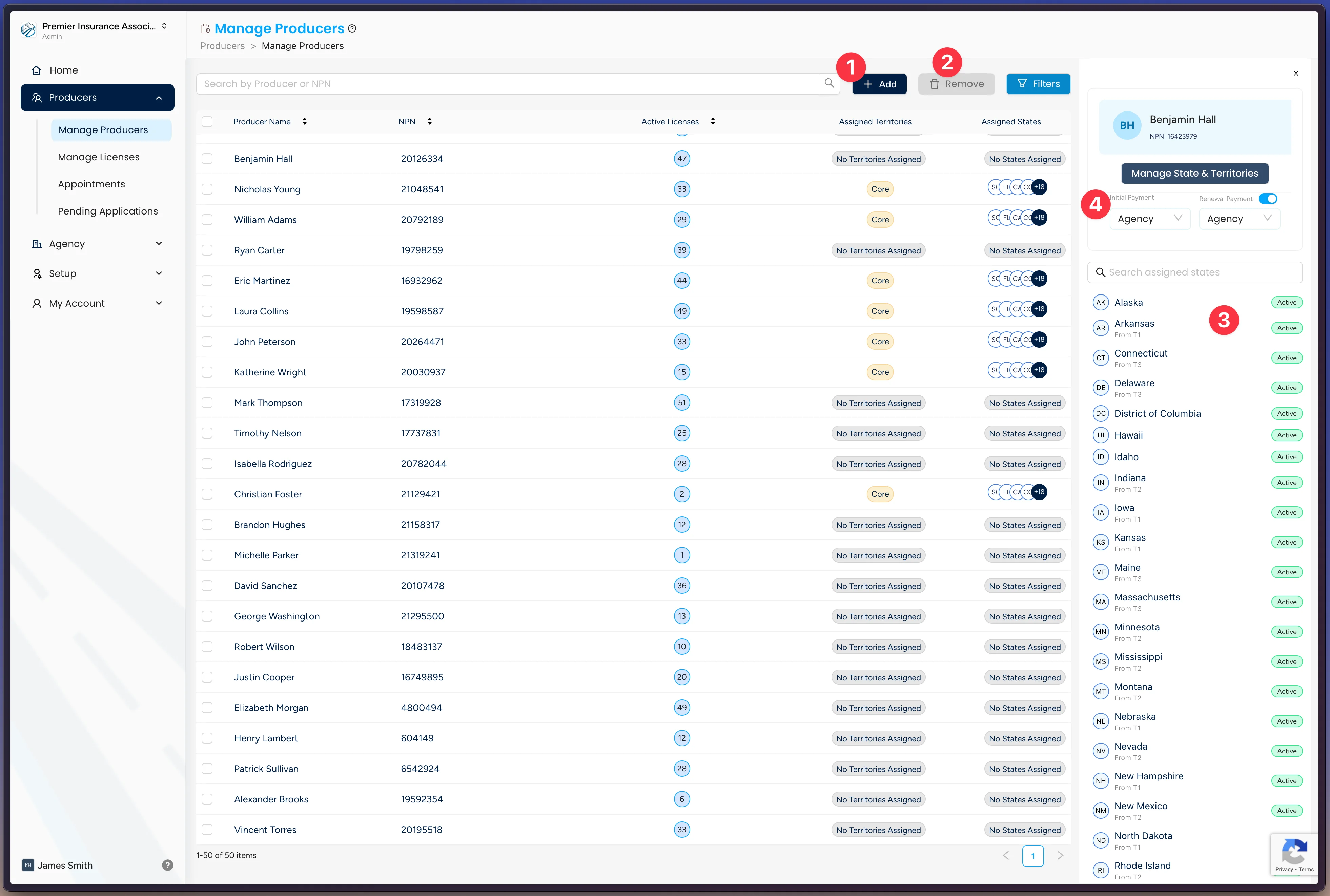
Now you can:
1. Add a single producer or do it in bulk
2. Remove producers by selecting them from the list, and clicking remove
3. See details about a producer in the side panel
4. Quickly get in to manage states, setup auto renewals, and decide who is paying for a producer's license
Other Fixes
- We also introduce a referral program, so you can share InsureTrek with other agents and get rewarded. Interested? [Let us know](mailto:hello@insuretrek.com).
- We made things look a bit nicer on signup: now you'll see a profile card with information we get back from NIPR
- We've made the Producer Portal act the same for both producers and administrators, so admins better know how to help folks on their team
Improved Producer Management and Performance Enhancements
Improved "Add a Producer"
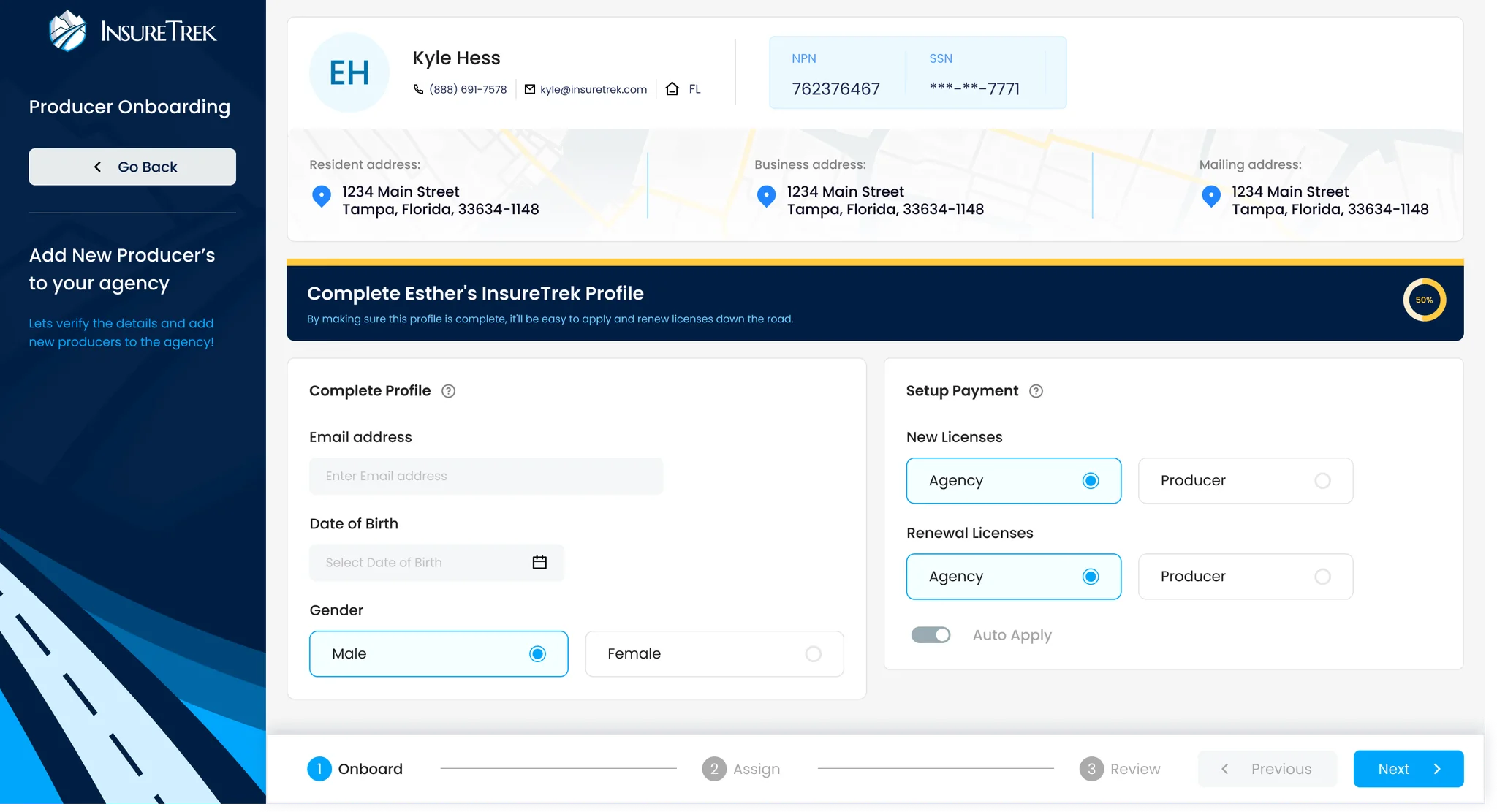
We've reworked the process of adding a producer from the ground up. It's not much faster to get a producers licensing information, set up their payment details, build out their assignments, and estimate their licensing cost. You can check it out by heading to the Add a Producer section.
Cleaned Up Menu
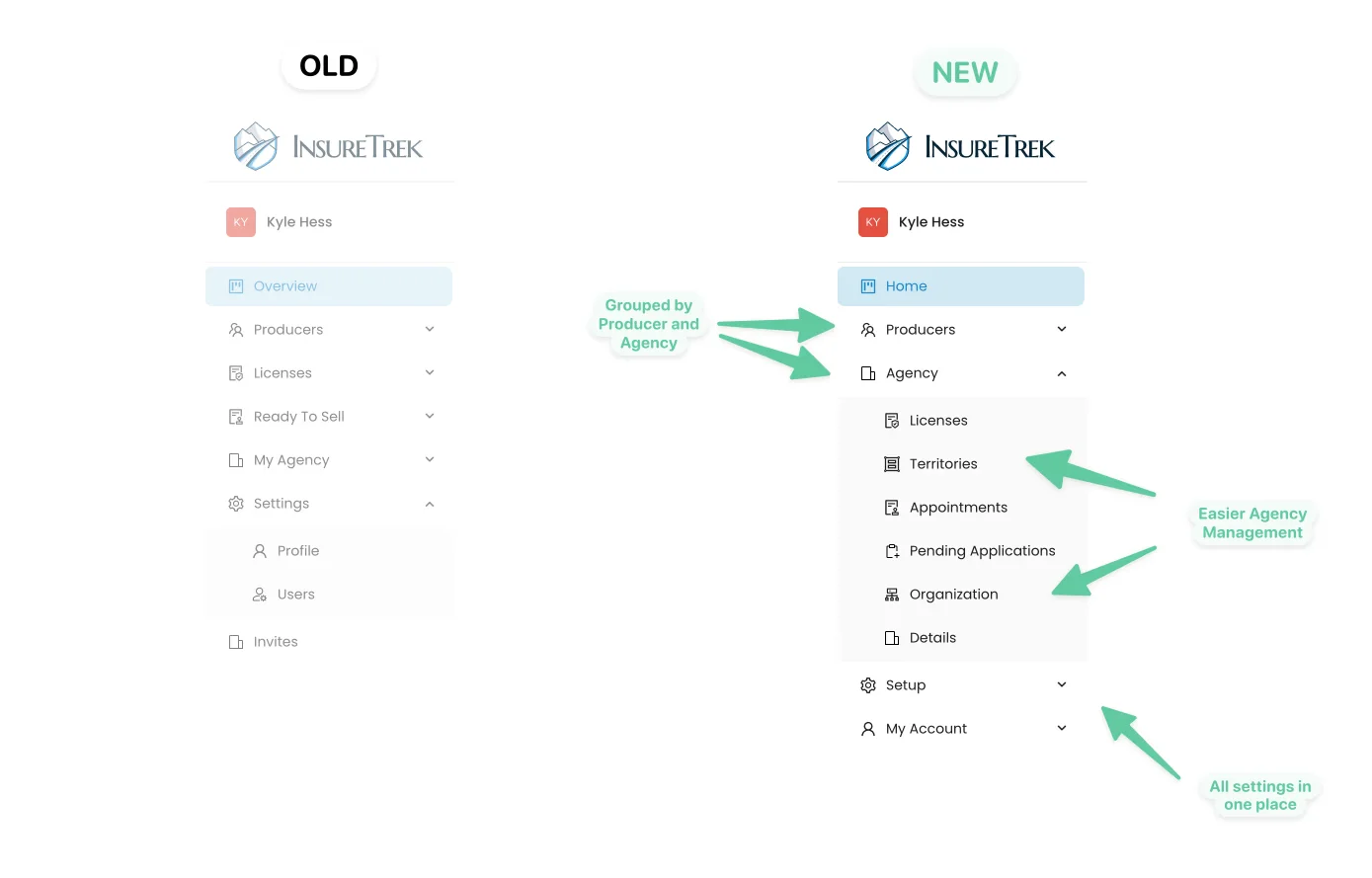
We've added a bunch of stuff into Insuretrek, so now is a good time to make things easier to navigate. Now the menu splits up all of the license is for your producers, your agency, and the rest of your set up. It's a small thing, but we think these changes make it a lot easier to get around.
Speed 🏎️
The last major update is something we hope you'll never actually notice. We have done a significant rebuild of how we keep and use all of your data. The end result is an app that works way faster across the board. Now, nearly every Paige loads in less than half a second.
Agency Licenses
InsureTrek can now handle all of your applications and renewals for both your producers and your agency.
The first thing you'll want to do is pull your current agency licenses from NIPR:
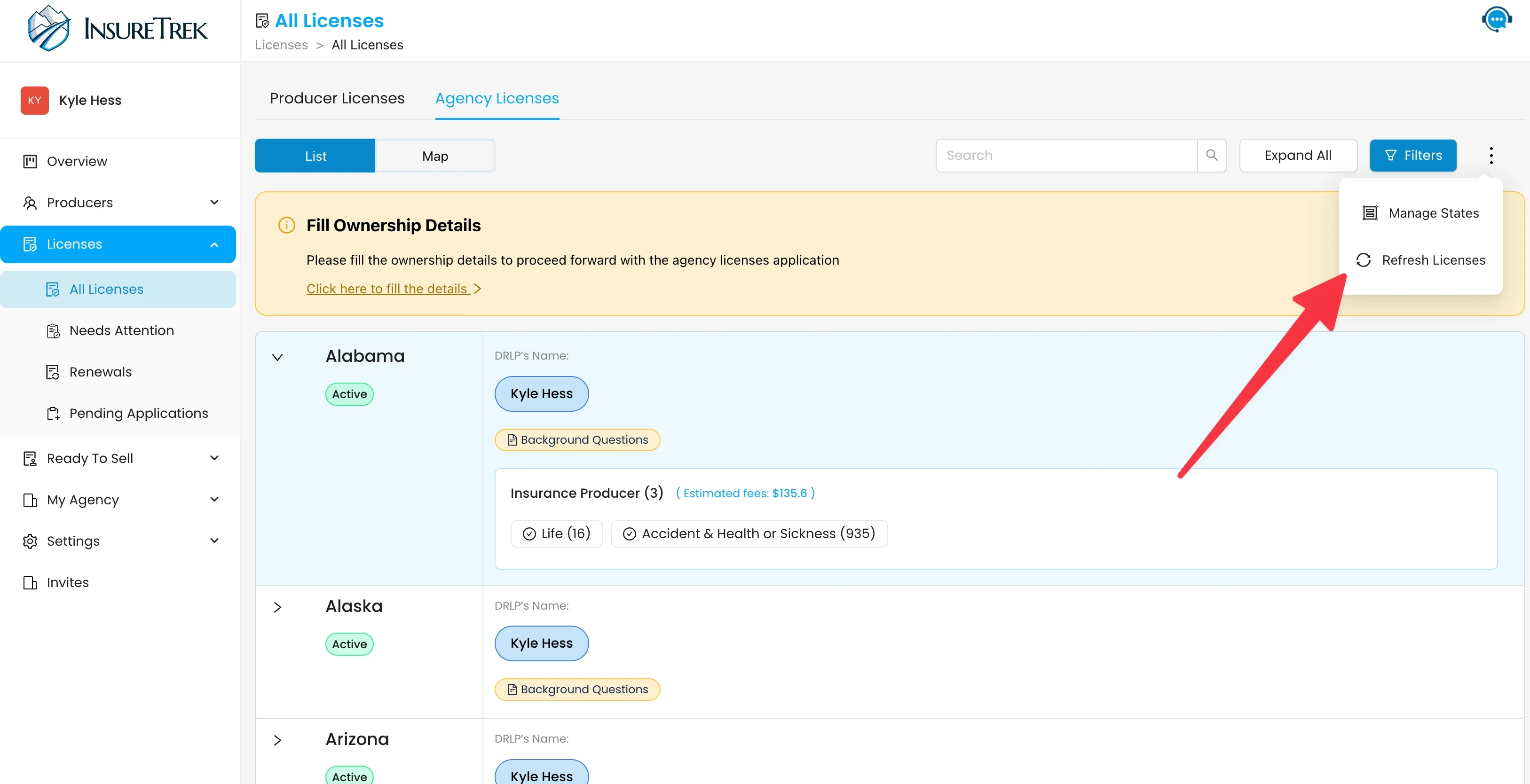
Then, if you want to apply for a new state, click "States" from the top right of the screen, pick which state and LOA you'd like, and assign a DRLP:
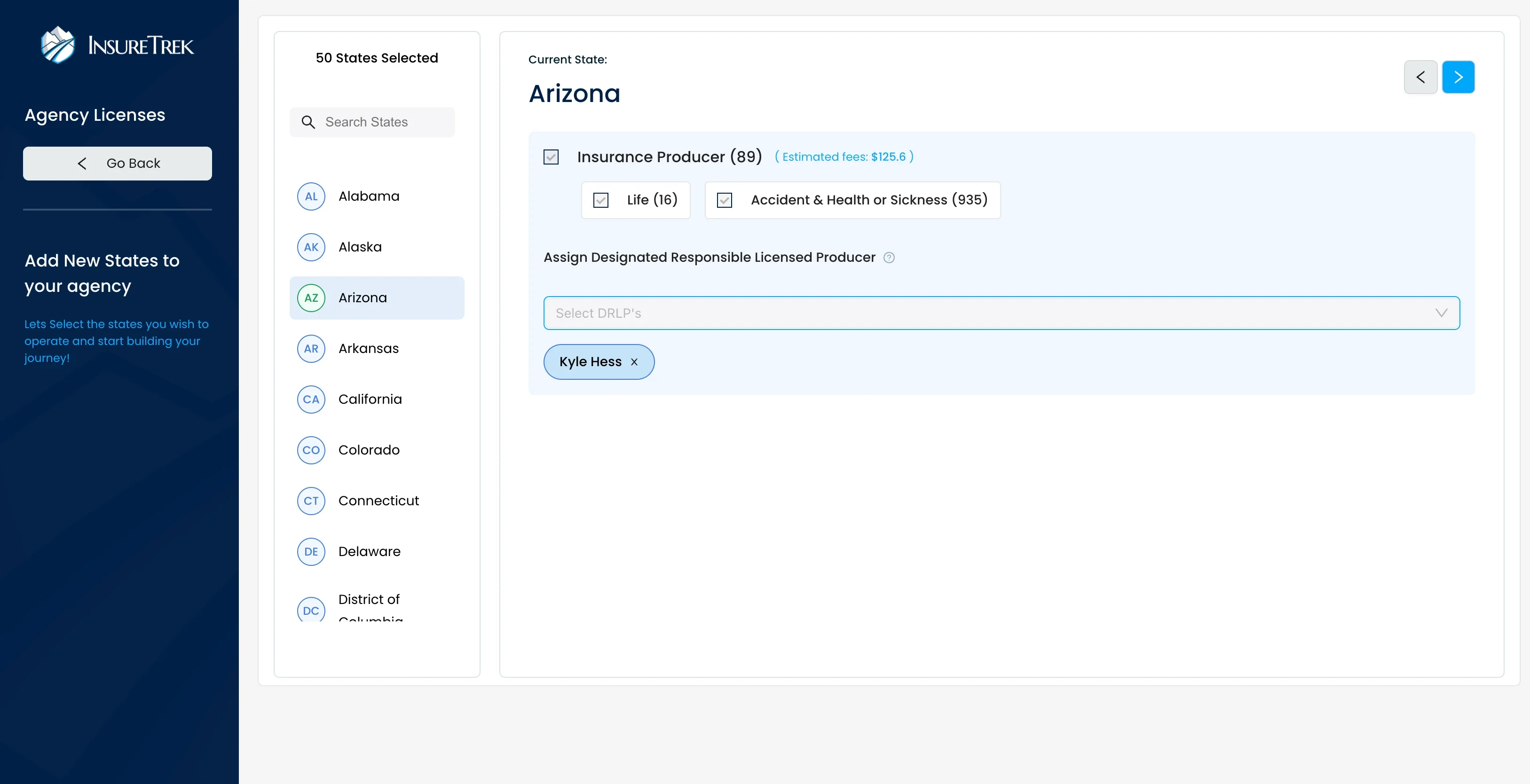
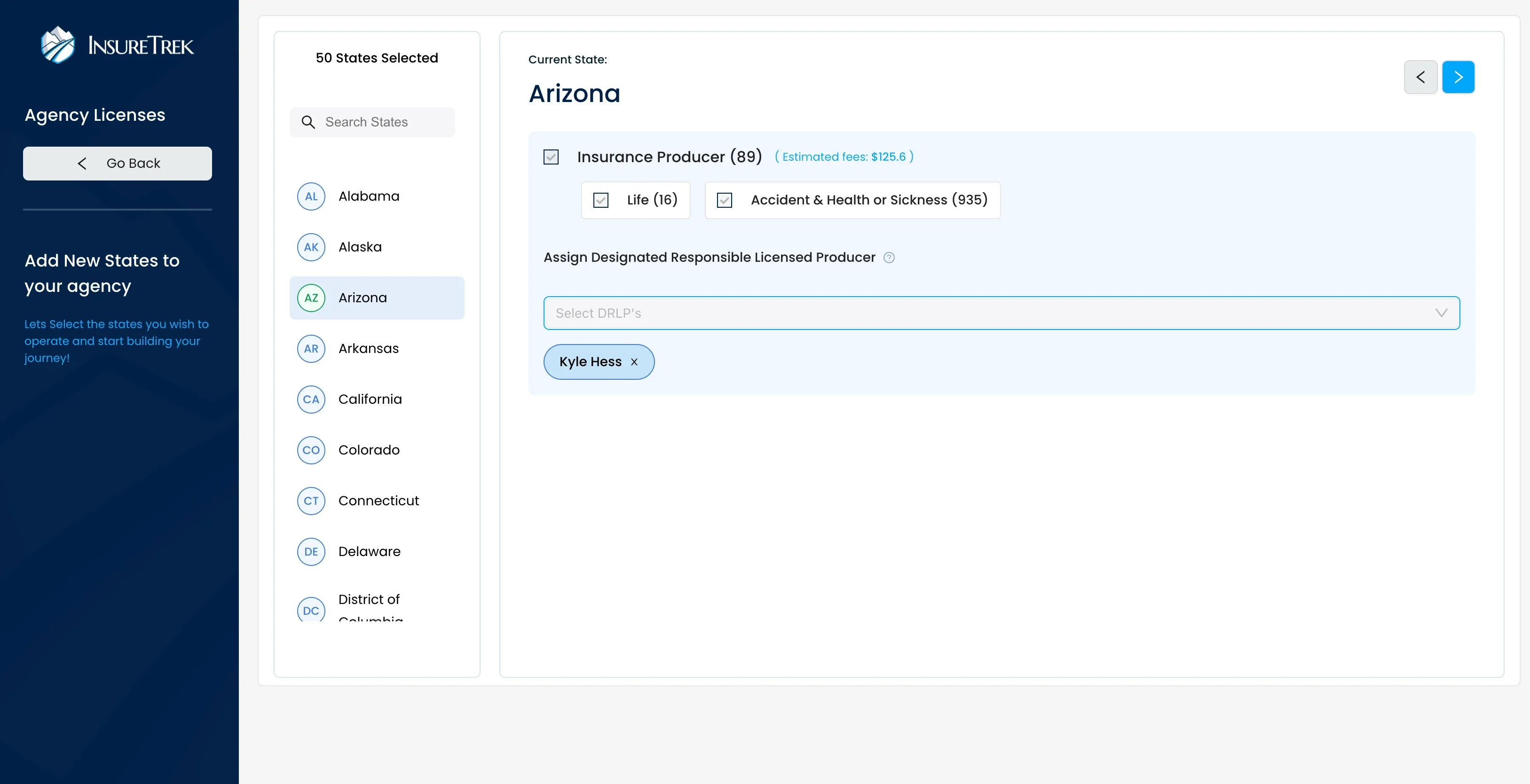
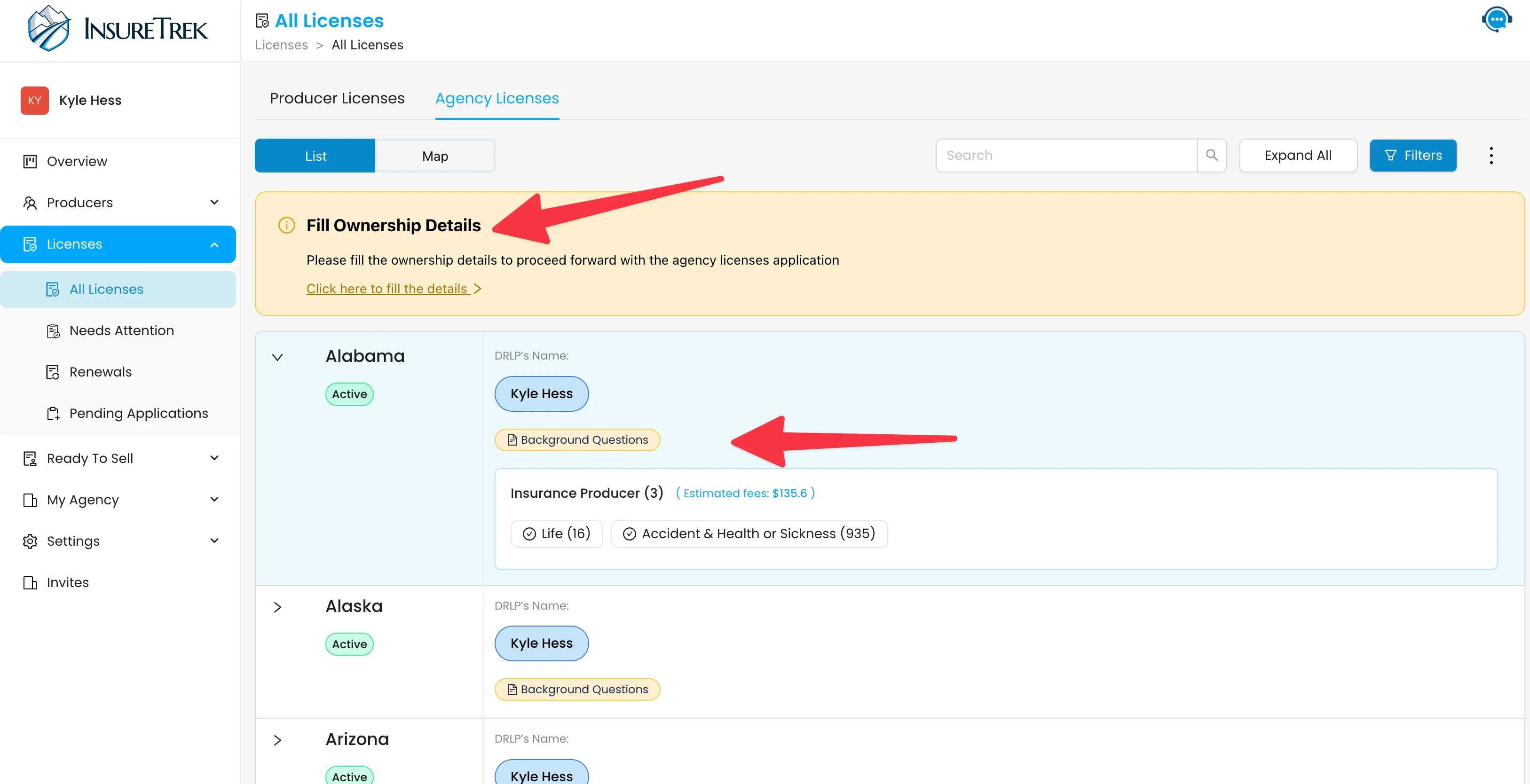
Your screen will now tell you if you're missing any information (agency licenses have their own background questions and ownership details):
Special Notes
- The states of Massachusetts and Washington both require additional information to apply for a new state, so they're not yet supported in Insuretrek. To apply for these licenses, we recommend heading to NIPR directly. Once these licenses are active, we will automatically see their status and help you renew them if necessary.
- Not all states report the assigned DRLP back to NIPR. So if you see an active license, but no DRLP assigned, no need to worry. We will alert you if anything goes wrong.
Self Service Onboarding
Now in InsureTrek, you can get everything started on your own. No need to wait for us to help pay any startup costs.
Getting an account created is simple:
Head to the signup page
Tell us your NPN
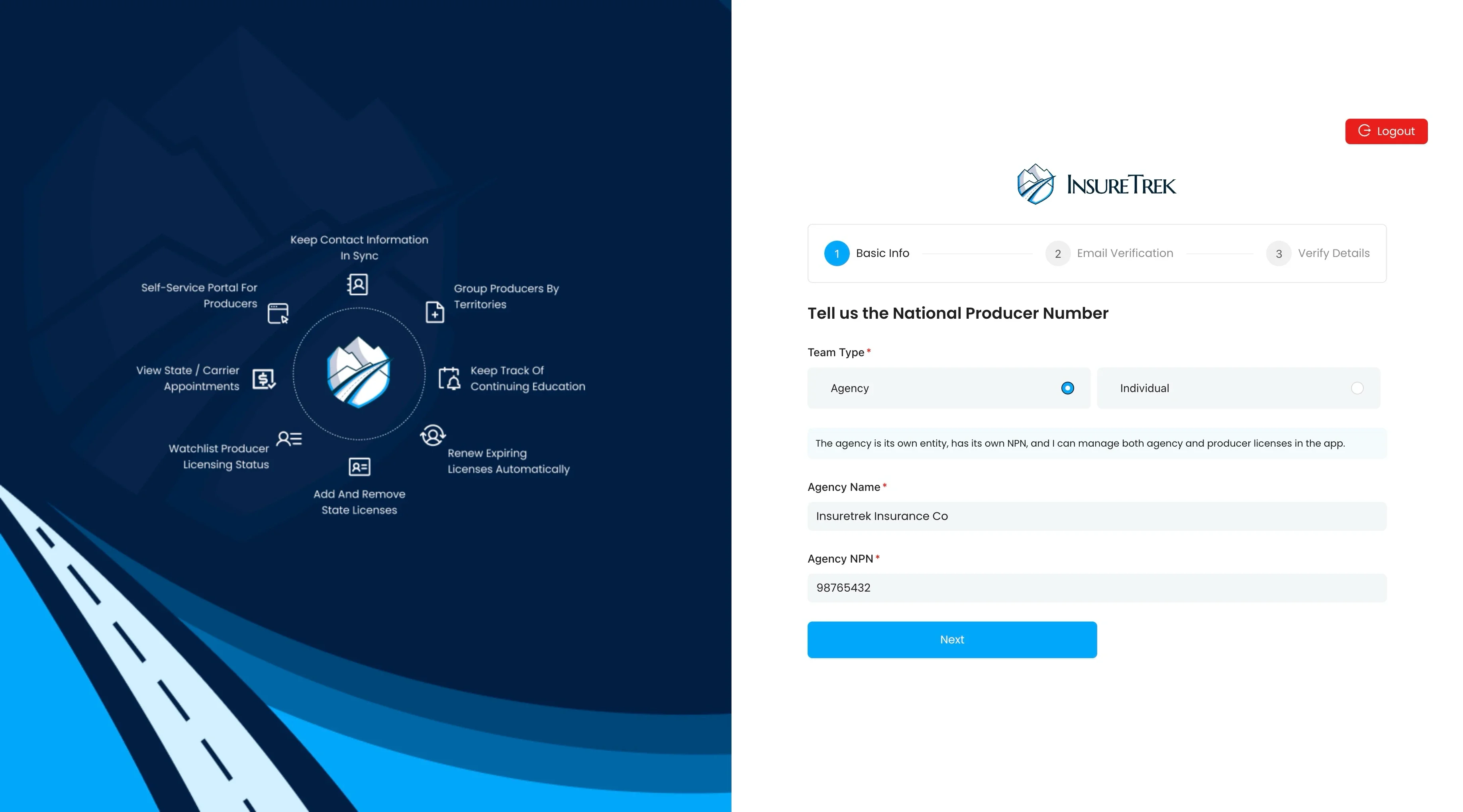
We'll verify your email with NIPR